High-Level React.js App Store Providers
Developing a React application is relatively easy. A small app can be built within a few hours.
Today, many startups prefer monolithic-style applications where they start with minimal effort and gradually scale as the product grows.
Starting small is always a good idea — but what’s more important is starting the right way.
This article is a quick guide for JavaScript developers on how to set up a scalable App Store architecture in React. You’ll learn how proper provider architecture makes state management clean, predictable, and easy to maintain as your app grows.
📐 High-Level Architecture
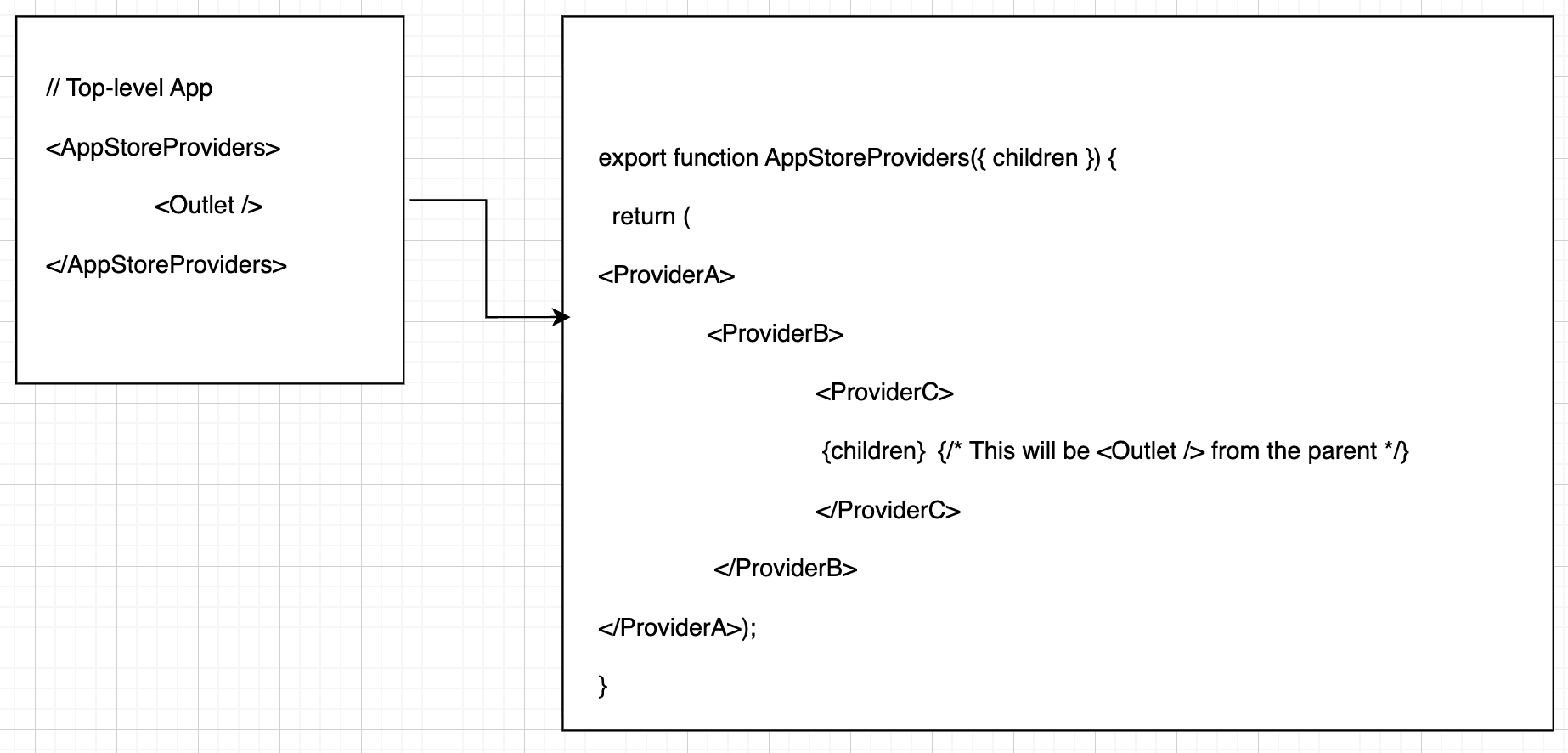
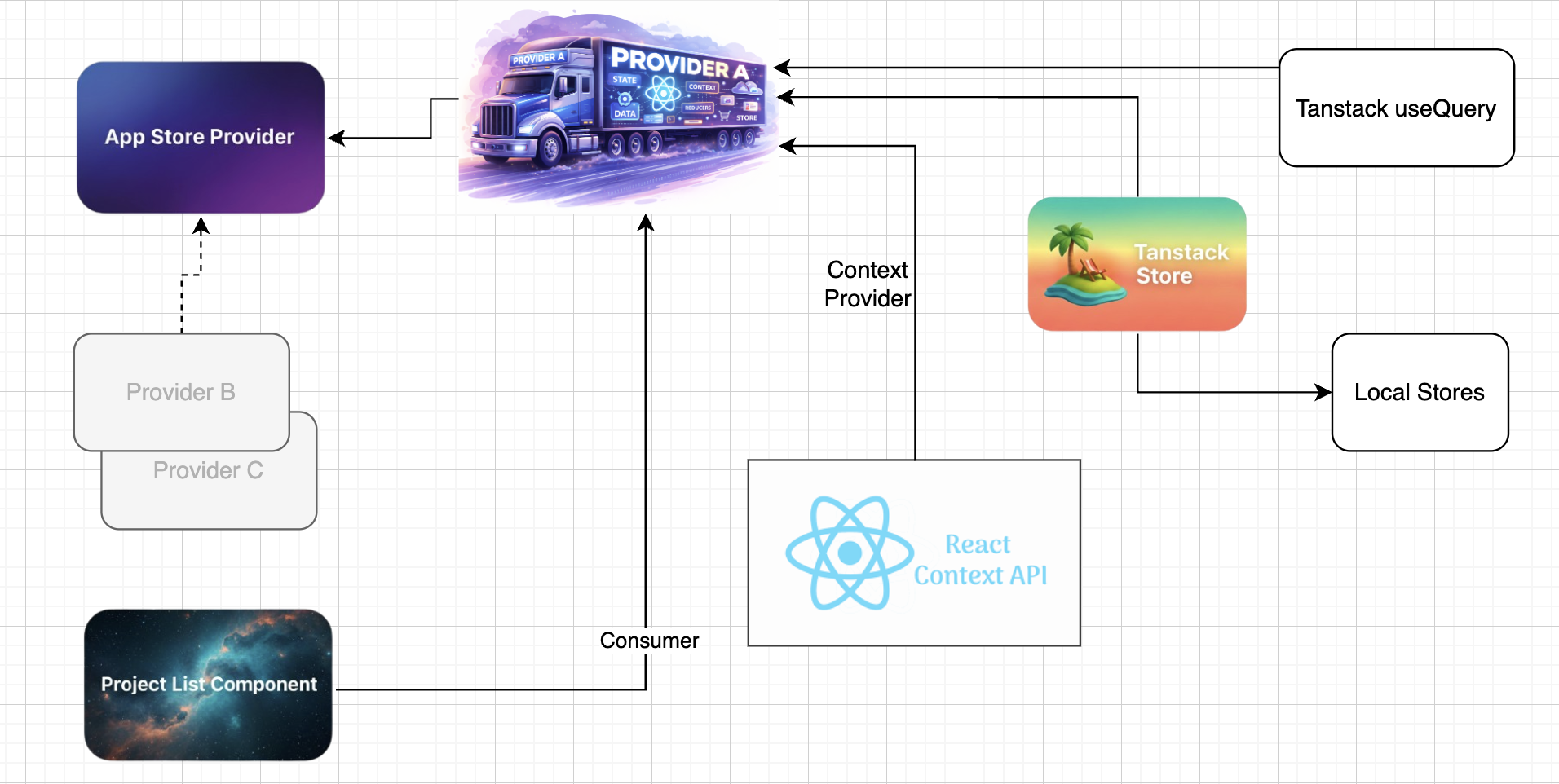
In this article, we focus only on the browser router–level configuration, where the application’s main providers are structured.
🏗️ AppStoreProviders – Why It Matters
<AppStoreProviders>
  <Outlet />
</AppStoreProviders>
AppStoreProviders is responsible for structuring your providers in a clean and readable way, removing unnecessary complexity from your main application entry point.
Instead of nesting providers everywhere, we centralize them in one place.
Inside AppStoreProviders, we typically use:
- Project Provider
- Product Provider
- Order Provider
For simplicity, in this article, we refer to them as Provider A, B, and C.
❓ What Is a Provider?
A Provider in React is a component that shares state or data with its child components (consumers).
- The provider provides the data
- The children consume the data
- This avoids prop drilling across the component tree
Providers are usually placed at the top level of the application hierarchy.
In our case, AppStoreProviders sits right next to the main App component.
🧩 What Does a Provider Contain?
A typical provider combines multiple tools:
- React Context API
- TanStack React Store (global state)
- TanStack React Query (server state)
- Local storage (persistence)
All of these are wrapped together using a Context Provider.
🧪 Sample Provider Implementation
import { useMemo, type PropsWithChildren } from 'react';
import { useStore } from '@tanstack/react-store';

import { ProjectsContext } from '@/features/projects/providers/projects.context';
import { ProjectStore } from '@/features/projects/stores/projects.store';
import { useProject } from '@/features/projects/hooks/useProjects';

export function ProjectsProvider({ children }: PropsWithChildren) {

  const useProjectHook = useProject();

  const projects = useMemo(
    () => useProjectHook.data || [],
    [useProjectHook.data]
  );

  const currentProject = useStore(ProjectStore.currentProject);

  function setProject(projectId: string) {
    const project = projects.find(p => p.id === projectId);
    if (project) ProjectStore.setProject(project);
  }

  function getStoredProjectId() {
    return ProjectStore.getStoredProjectId();
  }

  return (
    <ProjectsContext.Provider
      value={{
        setProject,
        projects,
        currentProject,
        projectListLoading: useProjectHook.isLoading,
        changeProject: () => {},
        getStoredProjectId
      }}
    >
      {children}
    </ProjectsContext.Provider>
  );
}
🔍 Deep Dive: useProject Hook
return useQuery<ProjectList[]>({
  queryFn: ProjectListService.getProjectsListData,
  queryKey: ["projectsListData"]
});
This hook uses TanStack React Query for server-side data fetching.
queryFnreturns the API promisequeryKeyidentifies and caches the data- Handles loading, caching, and refetching automatically
🗃️ Global State with TanStack Store
Inside ProjectsProvider, we access global state using:
useStore(ProjectStore.currentProject);import { Store } from "@tanstack/react-store";
import { Project } from "@/features/projects/types/projects.type";
import { getStoredProjectId, setLocalStoreProject } from "@/features/projects/stores/projects.local.store";
const currentProject = new Store<Project | undefined>(undefined);
export const ProjectStore = {
setProject: (state: Project) => {
currentProject.setState(state);
setLocalStoreProject(state.id);
},
currentProject,
getStoredProjectId
};This store:
- Maintains the selected project
- Persists data using local storage
- Separates UI state from server state
🔗 React Context Wiring
export const ProjectsContext = createContext({
  setProject: () => {},
  projects: [],
  changeProject: () => {},
  projectListLoading: false,
  getStoredProjectId: null
});
export function useProjectContext() {
return useContext(ProjectsContext);
}📦 Consuming the Provider
const { projects, setProject, getStoredProjectId } = useProjectContext();This allows components to consume shared state without managing their own global logic.
✅ Final Thoughts
This provider architecture enables:
- Clean separation of concerns
- Centralized state and data management
- Scalable application growth
- Minimal component-level complexity
By designing providers properly from the beginning, you ensure your React application remains maintainable, scalable, and predictable.